TL;DR
- AI speed without structure creates fragile apps and costly rework
- Use Workspace (clarity), Template (foundation), Agent (bounded AI) to go from demo to product
- Define a 1–3 page Workspace, build on a repeatable Template, ship small AI-driven increments
- Review quickly, enforce permissions and stability, then iterate predictably
- Structure raises sustainable speed; avoid giant AI builds and vague scopes
Fact Box
- Workspace: 1–3 pages with a one-liner, three core actions, testable 'done' checks, and what's out of scope.
- Template standardizes accounts, permissions, security defaults, error handling, logging, and deployment.
- Agent: use AI for small, bounded tasks (invites, trials, RBAC) within the Template, reviewed before shipping.
- Loop: define in Workspace, build on Template, assign one AI task, review, ship, observe, repeat.
- Teams without standardization face higher failure rates and slower recovery, per the 2023–2024 State of DevOps Report.
What if the real problem with AI-built apps isn’t the AI, but the lack of a system behind it? Read to the end to see how to turn fast AI prototypes into stable, sellable products without slowing your team down.
When founders and SMB leaders search for guidance on AI app development, they’re usually asking questions like:
- Why does my AI-built app feel impressive at first… but fragile later?
- How do I keep AI speed without creating technical chaos?
- What does production-ready actually mean for a startup?
- Is there a structured way to scale AI-built software?
As Andrej Karpathy famously put it, The hottest new programming language is English. But speaking English to an AI isn’t enough, structure still matters.
The problem is real and growing. According to the 2023-2024 State of DevOps Report by Google Cloud, teams that lack clear processes and standardization experience significantly higher failure rates and slower recovery times. At the same time, industry research from McKinsey on generative AI adoption highlights that while AI accelerates development, organizations without governance and operational discipline struggle to translate speed into business value. In other words, AI can increase output, but without structure, it can also increase instability.
By reading this article, you’ll understand a practical, non-technical framework, the Workspace + Template + Agent method, that helps startups and SMBs move from vibe coding to production. You’ll learn how to clarify requirements, standardize your foundation, use AI in controlled increments, and build software that’s not just fast to create, but reliable enough to grow a real business on.
Why Vibe Coding Feels Fast, Until It Gets Expensive
At first, AI-built development feels like a breakthrough. You move from idea to working interface in hours. The dopamine hit is real. But what feels like acceleration can quietly become an accumulation of hidden decisions, inconsistencies, and future rework.

The illusion Of speed
Vibe coding feels fast because it removes friction. You describe what you want in plain English, the AI generates something that works, and within hours you have screens, flows, maybe even payments hooked up. Compared to traditional development cycles, it feels almost unfair.
But that speed is front-loaded. It gives you visible output without forcing you to make visible decisions.
Invisible Decisions Become Visible Problems
When you build this way, decisions are made implicitly. The AI chooses structure, naming, permissions, error handling, and data relationships. It fills in gaps based on probability, not strategy.
At first, that’s fine. You just need something working.
But as soon as you add the second, third, or fourth feature, those invisible decisions start to collide.
Small inconsistencies multiply. One part of the app handles permissions strictly; another forgets to check them. One workflow validates input carefully; another assumes the user will behave perfectly. Changes that should take an hour suddenly take two days because no one is fully sure how the system is wired together.
Where The Real Cost Appears
The cost doesn’t show up immediately. It shows up in three forms: rework, instability, and hesitation.
Rework happens because what was built quickly wasn’t aligned with a clear definition of done. You rebuild features not because they failed, but because they weren’t built with the real use case in mind.
Instability appears when adding something new breaks something old. Without structure, each change increases risk. Teams become cautious. Momentum slows.
Hesitation is the hidden tax. Your team stops shipping confidently. Every release feels like a gamble. Instead of building forward, you spend time protecting what already exists.
The Real Issue
Vibe coding isn’t the problem. Lack of structure is.
AI amplifies whatever environment it operates in. If the environment is unclear, fragile, or inconsistent, it will produce speed on top of fragility.
That’s why the transition from prototype to production isn’t about writing better prompts. It’s about introducing a system that supports growth before the complexity becomes expensive.
What Separates A Demo From A Product?
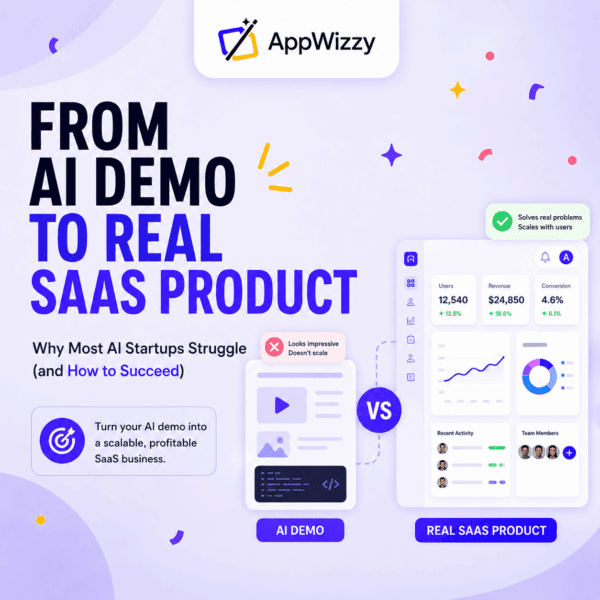
A demo proves that something works. A product proves that it keeps working, for real users, in real conditions, over time.
When you build a demo, you’re focused on showing potential. You make sure the main flow works. You polish the visible parts. You test the happy path. It looks clean because it avoids complexity.
A product is different. It doesn’t live on the happy path.
Real users forget passwords. They upload the wrong files. They invite the wrong teammate. They try to use features in ways you didn’t expect. They log in from different devices. They rely on your app for their daily work. And when something goes wrong, they expect it to be stable, secure, and fixable.
That’s where structure starts to matter.
A demo can tolerate ambiguity. A product cannot. A demo can assume behavior. A product must define and enforce rules. A demo can ignore edge cases. A product must handle them.
The shift from demo to product isn’t about adding more features. It’s about adding clarity and discipline. Is it the moment you stop asking, Does it work? and start asking, Can we confidently sell this, support it, and build on top of it?
That shift requires structure. It requires clear expectations, a stable foundation, and controlled execution. And that’s exactly where the Workspace + Template + Agent method comes in.

Step 1: Workspace. Make the app real before you build it
Before writing code or asking AI to generate anything, you need clarity. Not a long specification. Not a corporate document. Just a clear understanding of what you are building and what done actually means.
A Workspace is simply a small set of notes that answers one important question: what are we building, exactly?
For most startups and SMBs, this can fit into one to three pages. Start with a short one-liner describing the product and who it is for. Then define the three most important things a user must be able to do. Not twenty features. Just the core actions that make the product valuable.
Next, define what done means in practical terms. Write short, testable statements like users can sign up and log in, admins can invite teammates, or billing is visible only to administrators. If it can’t be clearly checked, it’s too vague.
Finally, write down what is not included for now. This may be the most important part. It prevents scope creep and endless expansion before the basics are solid.
The Workspace forces alignment. It prevents you from building the wrong thing quickly. It keeps AI and your team focused. And it turns abstract ideas into something concrete enough to execute.
If it’s not written down in the Workspace, you should assume it’s not guaranteed to be built.
Step 2: Template. Build On a Stable Foundation
Once you know what you’re building, the next step is making sure you’re not rebuilding the basics from scratch.
A Template is your starting foundation for a real product. Not a design template, but a structural one. It includes the essential components that almost every serious application needs: user accounts, permissions, security defaults, error handling, logging, and a reliable deployment process.
These things are rarely exciting. They don’t show up in marketing screenshots. But they are what make software stable.
Without a template, every project becomes a one-off. That feels flexible in the beginning. You can do anything. But over time, that flexibility becomes a source of complexity. Every feature behaves slightly differently. Every new developer needs time to understand how things work. Small changes create unexpected side effects.
Templates reduce friction over time. They make future decisions cheaper. They allow your team to focus on what makes your product unique instead of constantly reinventing the basics.
For startups and SMBs, this is critical. Speed matters, but sustainable speed matters more.
Step 3: Agent. Use AI With Control, Not Blind Trust
With clarity from the Workspace and stability from the Template, AI becomes powerful in the right way.
An Agent is simply AI working within boundaries. It reads the Workspace to understand the goal. It follows the Template to respect structure. And it builds features step by step.
The key difference is how you use it.
Instead of asking AI to build a CRM or create a SaaS platform, you assign it small, specific tasks. Add team invitations. Implement trial expiration. Add role-based permissions. Improve billing visibility. Each task should be clear, limited in scope, and aligned with what you defined earlier.
This approach keeps you in control. You review what’s built. You test it. You ship it. Then you move to the next piece.
AI should behave like a capable worker, not a magician. When you give it clear instructions and boundaries, it accelerates execution without creating chaos.
Small, reviewable increments are what turn AI-generated code into production-ready software.
Putting It Together: How The Method Works In Real Life

All of this sounds structured, and it is, but in practice it’s simple. You don’t need a transformation program. You need a repeatable loop. Here’s what it looks like in the real world for an SMB or startup.
You start by writing or updating the Workspace. Before building anything new, you answer one question: what exactly are we building next? Not in abstract terms. In clear, testable terms. One feature. One improvement. One concrete outcome.
Then you build on top of your Template. You don’t rethink user roles, permissions, or deployment every time. The basics are already stable. That means you’re not spending energy on infrastructure when you should be focusing on value.
Next, you give the Agent one clear task. Not improve the app. Not make it better. One feature is defined in the Workspace. AI works best when the scope is tight and expectations are clear.
After that, you review quickly. A human checks the result. Does it match what we asked for? Does it break anything? Is it secure? This isn’t a long committee process. It’s a sanity check.
Then you ship. You release. You observe how users react. You collect feedback. And you repeat the loop. That’s it. This approach keeps speed high without turning your app into a fragile mess. You move fast, but in controlled steps.
What Production-Ready Means (In Business Terms)

For non-technical teams, production-ready doesn’t mean elegant architecture or perfect code. It means business confidence.
It means you can sell the product without worrying that the first serious customer will expose something fundamental that doesn’t work. The core flows are solid. Permissions behave correctly. Data doesn’t disappear. The basics hold up under normal use.
It also means you can support it. When something goes wrong, and something always does, you’re not guessing. You can see what happened. You can trace the issue. You can fix it without rewriting half the system. Support becomes manageable instead of stressful.
Production-ready also means you can update the product without fear. New features don’t randomly break existing ones. Improvements don’t create hidden side effects. Your team can move forward without constantly cleaning up the past.
And finally, it means you can grow the team. A new developer can understand how things are structured. There are clear patterns. Clear boundaries. Clear responsibilities. The product isn’t a black box that only one person understands.
In business terms, production-ready means predictable. Predictable sales conversations. Predictable releases. Predictable support. Predictable growth.
The Workspace + Template + Agent method is simply a structured way to reach that predictability faster, without giving up the speed that AI makes possible.
Structure Doesn’t Slow You Down, It Keeps You Moving
When people hear the word structure, they often assume it means more process, more meetings, more delays. For startups, especially, that feels dangerous. Speed is survival. If something feels like it might slow you down, the instinct is to avoid it.
But in reality, most teams don’t lose time because they are too structured. They lost time because they weren’t clear. They rebuild features that were almost right. They fix issues caused by inconsistent decisions. They hesitate to release updates because they’re not fully sure what might break. They spend days untangling something that should have taken hours.
That’s not speed. It just feels like speed at the beginning. The Workspace + Template + Agent approach isn’t about adding bureaucracy. It’s about reducing avoidable friction. A short Workspace prevents misunderstandings. A stable Template prevents recurring technical problems. Small, well-defined AI tasks prevent oversized, fragile changes.
You’re not adding extra work. You’re shifting the effort from fixing later to deciding clearly now. And over time, that’s what keeps you moving.
Common Mistakes (And How To Avoid Them)
Even with the right intentions, teams fall into predictable traps. The good news is they’re easy to fix once you recognize them.
Let’s just build first
This is the most common mistake. The idea feels clear in your head, so you start building immediately. AI makes this even more tempting because it produces results fast.
The problem is that speed without clarity creates rework. You end up rebuilding features not because they were coded badly, but because they were never fully defined.
How To Avoid: Write a one-page Workspace first. Define what you’re building and what done means. It may take an hour. It can save weeks.
Building features without a stable foundation
Some teams treat every new app or feature as a fresh start. Authentication is handled slightly differently each time. Permissions evolve randomly. Error handling is inconsistent.
It works at first. Later, maintenance becomes expensive and unpredictable.
How To Avoid: Start from a proven Template. Reuse the same structural foundation for every project. Templates are not exciting, but they create stability. Stability creates leverage.
Asking AI for huge builds
Telling AI to build a CRM or create a SaaS platform sounds efficient. In practice, it produces something large, hard to review, and difficult to trust.
When too much is generated at once, you lose visibility and control.
How To Avoid: Break work into small, clearly defined tasks. One feature at a time. Review. Ship. Repeat. Small increments compound faster than big rewrites.
No clear definition of done
Without a definition of done, everything feels almost finished. Teams ship features that technically work but don’t fully match expectations.
This creates friction between founders, developers, and customers.
How To Avoid: Use a short checklist for every feature:
- Does it match the Workspace requirements?
- Does it avoid breaking existing flows?
- Does it handle obvious edge cases?
- Is access properly restricted?
- Is it ready to deploy?
Clarity at the end prevents confusion later.
Most failures in AI-driven development aren’t caused by bad technology. They’re caused by a missing structure. When you fix the structure, the technology starts working in your favor.
Where This Fits In Practice
You don’t need a complicated stack to apply this method. What matters is structure, not the number of tools you use.
If you’re looking for an environment that naturally supports the Workspace + Template + Agent approach, Appwizzy is built around that logic. It’s designed to help teams combine AI execution with a stable foundation, so you’re not starting from chaos every time you build.
That said, the method itself is tool-agnostic. Your Workspace can live in Notion or Google Docs. Tasks can be managed in Trello, Jira, or Linear. Code can be versioned in GitHub or GitLab. Figma can clarify interfaces early. Slack can keep decisions visible so context doesn’t get lost.
You can run this approach with fewer tools if needed. The point isn’t the platform, it’s the structure behind it.
If you’re already experimenting with AI to build apps, the real shift isn’t adopting another tool. It’s adopting a disciplined loop: define clearly, build on a stable base, execute in small increments, review, ship, repeat.
That’s what turns AI-generated output into something you can confidently sell, support, and grow.
Conclusion: Speed Is Easy. Stability Is a Choice.
AI has changed how software gets built. The barrier to creating something that works has dropped dramatically. You can go from idea to interface in hours. That’s powerful.
But building something that works is not the same as building something you can run a business on. The real shift is not from manual coding to AI coding. It’s from improvisation to structure.
When you introduce a Workspace, you make your intent explicit. When you use a Template, you remove unnecessary risk. When you guide an Agent with boundaries, you turn AI into leverage instead of chaos.
That’s the difference between a demo that impresses for a moment and a product that survives real users, real pressure, and real growth.
If you’re already building with AI, you don’t need to slow down. You need to channel that speed. Platforms like Appwizzy are built around this structured approach, combining AI execution with a stable foundation, so you’re not starting from zero every time. But regardless of the tools you use, the principle remains the same: clarity first, structure second, execution in controlled steps.
The future of software isn’t slower. It’s smarter. Teams that win won’t be the ones generating the most code. They’ll be the ones operating with the most discipline. They’ll move fast, but they’ll move in a system.
Vibe coding got us excited. Structure is what turns that excitement into sustainable growth. And that’s what moves you from prototype to product.
Comments